Capture a website as a reference
Capture a live web app you own or may analyse. M1rror extracts its palette, type, spacing, radii, shadows and patterns as evidence-backed design tokens.
On this page
Capturing a website reads a live web app the way a careful designer would: its colours, type, spacing, corners, shadows, motion, breakpoints and recurring component patterns. The result becomes a reference on your board, and optionally a design direction you can build on.
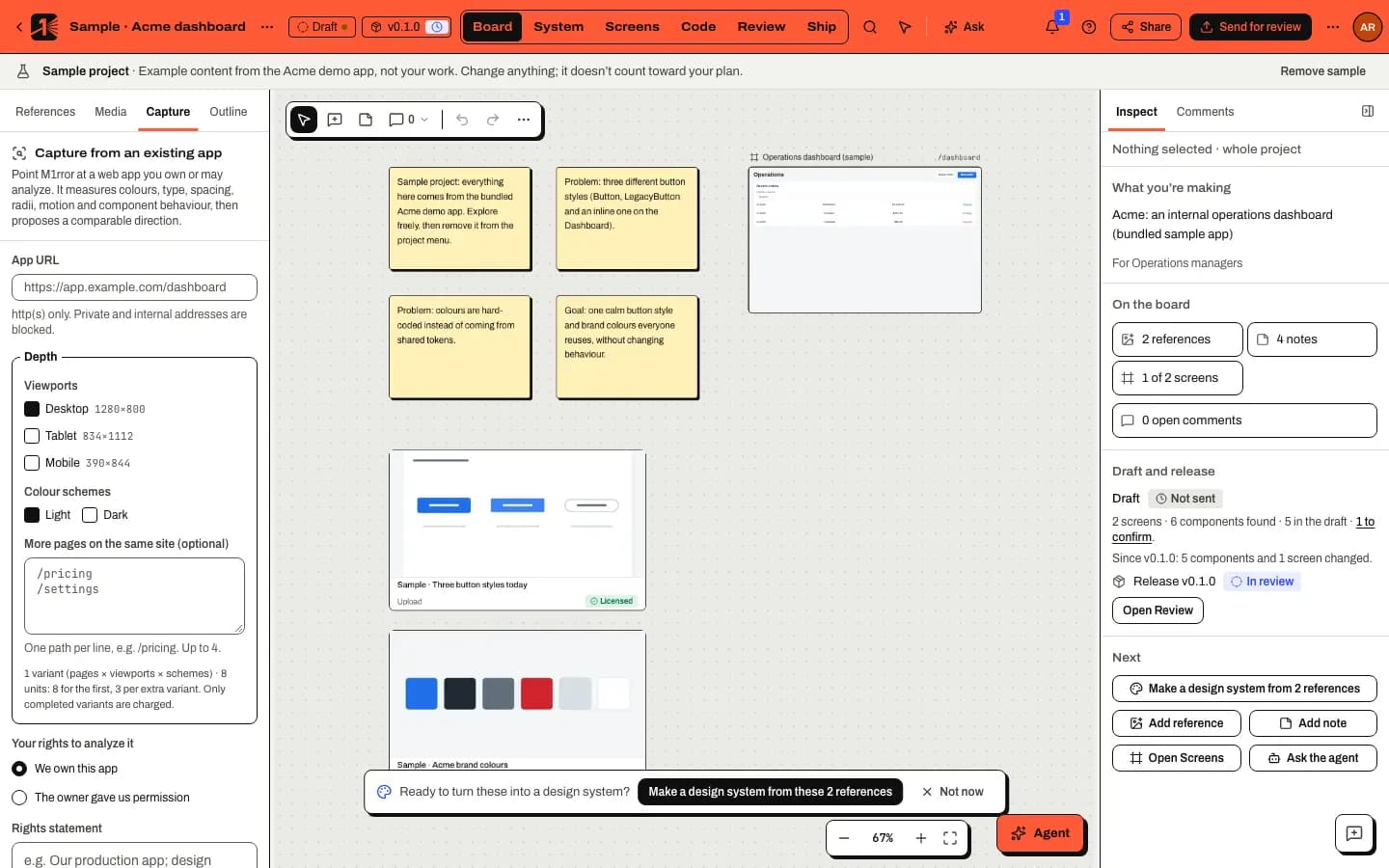
Capture a site
Open Capture
In Board mode open the Capture tab in the left panel, or choose Add reference › Capture a web page. Starting a new project with Capture a live website opens the same form with the address filled in.
Enter the address
Type the page's address in App URL, for example
https://app.example.com/dashboard. Onlyhttpandhttpsaddresses work, and private or internal addresses are blocked.Choose what to capture
By default M1rror captures one page at one size. You can add:
- Viewports: desktop (1280 × 800), tablet (834 × 1112) and mobile (390 × 844).
- Colour schemes: light, dark or both.
- More pages on the same site (optional): one path per line, up to four more pages.
Each combination is a variant, up to 12 per capture.
Record the rights
Add a Rights statement and tick I own this app or have permission to analyze it; capture won't start without it. Then decide:
- whether to store a viewport screenshot with the reference;
- whether agents and models may read this capture;
- Review first, if you'd rather check the result before M1rror creates the reference and a direction.
Start the capture
The button shows the price before you start, for example Capture · 8 units. The first variant costs 8 usage units, and each extra variant costs less. You can watch it move through its phases and cancel at any time.
Review the evidence and use it
The result opens in Inspect with sections for the screenshot, palette (and dark palette), typography, spacing, radii and shadows, motion and breakpoints, component patterns, interaction and accessibility, how values map to tokens, the rationale and the limitations. Select Add as reference to keep it on the board and Create direction to turn it into a design direction in System.
What is and isn't extracted
Capture reads computed styles and structure. It doesn't copy content: logos, images, page copy, font files and scripts stay on the original site. The Limitations section of each result says what couldn't be read, so a missing value is never guessed.
Capturing desktop apps and uploaded bundles is marked Coming soon in the product.
Related
Last updated
Edit this page on GitHub